
One of the great benefits of our direct download version of Paperman is the enhanced compatibility it offers with powerful macOS drag-to-edge apps like Rectangle, Moom, and other window snapping utilities.
Why the Direct Download Version is Better for Compatibility
Apps distributed through the Mac App Store are required to run within a strict sandbox. While this provides security, it also prevents apps from communicating or interacting smoothly with system-level utilities. If you've ever found that Paperman didn't quite play nicely with your favorite drag-to-edge apps when downloaded from the App Store, sandboxing was the reason.
Working Seamlessly Together
By offering a direct download version that is notarized by Apple and distributed securely outside the App Store, Paperman can now fully support integrations with your favorite workflow tools. Whether you rely on Rectangle, Moom, or any other drag-to-edge window manager, the Paperman effect will now work harmoniously alongside them.
How to Get It
If you rely on these tools, we highly recommend upgrading to the direct download version of Paperman. You can get it right here: paperman.cc/upgrade-for-mac.
For Mac App Store Users
Because you supported us early on the Mac App Store, we didn't want you to have to pay for Paperman 3. We're offering a completely free transition to our standalone lifetime license so you can enjoy these new capabilities right away.
Simply follow these three steps to claim your license:
-
Find your App Store receipt: Open Finder and go to your Applications folder. Right-click on Paperman and select Show Package Contents.
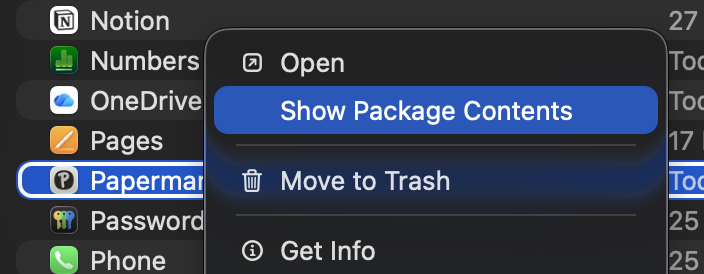 Next, navigate to
 Contents > _MASReceipt. You will find a file namedreceipt- this is exactly what we need!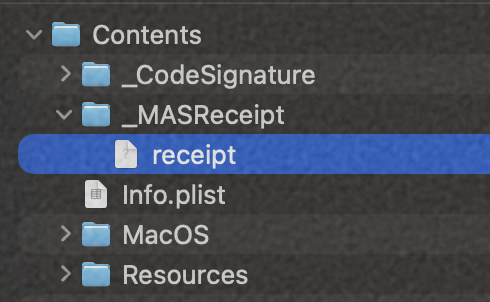
-
Share your receipt via email: Send an email to help@doubl.one with the
receiptfile attached. Be sure to send this from the email address you want your new Paperman license linked to. - Get your license: Once shared and confirmed, we will reply with your new license key and download access to Paperman 3!
We built Paperman to help you stay focused, and we want to make sure your tools always work perfectly together. If you have any questions about the direct download version, or if you run into any issues during the upgrade, just reach out to us. We're always here to help!
P.S. We have a lot of exciting updates coming up this summer, so stay tuned! Feel free to join our community on Reddit and follow us on X (Twitter) to keep up with the latest news.